Media content

I4 Insights

Empowering ship operators to make proactive decisions at a glance.

Empowering ship operators to make proactive decisions at a glance.

overview

Tension

The maritime industry faced a critical mismatch: operators needed constant access to performance and environmental data, but it was splintered across disconnected Power BI dashboards. Operators were forced to toggle between multiple pages to cross-reference data which in turn slowed decision making and created friction in high-pressure moments.

Approach

We consolidated scattered data into a unified hub with an integrated map and list view, refined alert system, and cohesive design system. This transformed the experience from reactive dashboard monitoring to proactive decision making, supporting complex workflows like route simulation and cost optimization with readily available essential data.

Key Roles

Lead Product Designer: Myself

Creative Director: Dhruv Chanchani

Product Manager: Mark Fordice

Product Designer: Jonathan Laing

research

During our discovery phase we collaborated with maritime professionals and SME's to better understand the existing product, operator workflows and maritime software landscape.

During our discovery phase we collaborated with maritime professionals and SME's to better understand the existing product, operator workflows and maritime software landscape.

Braindump of Requirements
We conducted a colllaborative workshop to identify what would make this product a success.
Rapid Ideation / Iteration
During this workshop we iterated with many concepts, quickly generating a large collection of ideas, features and solutions to explore.
Skeching: Operator View
Early concepts showing how the operator hub pairs a live vessel card list with an interactive maritime map for geospatial context.
Sketching: Active Vessel
We designed vessel detail screens that layered additional context: position, alerts, weather, and performance data—all accessible without overwhelming the interface.
Sketching: Vessel Detail
Clicking into a vessel presents a focused detail view combining tracking, performance data, weather, and alerts with tools to snooze notifications, add context, and communicate directly with the vessel.
Sketching: Port Details
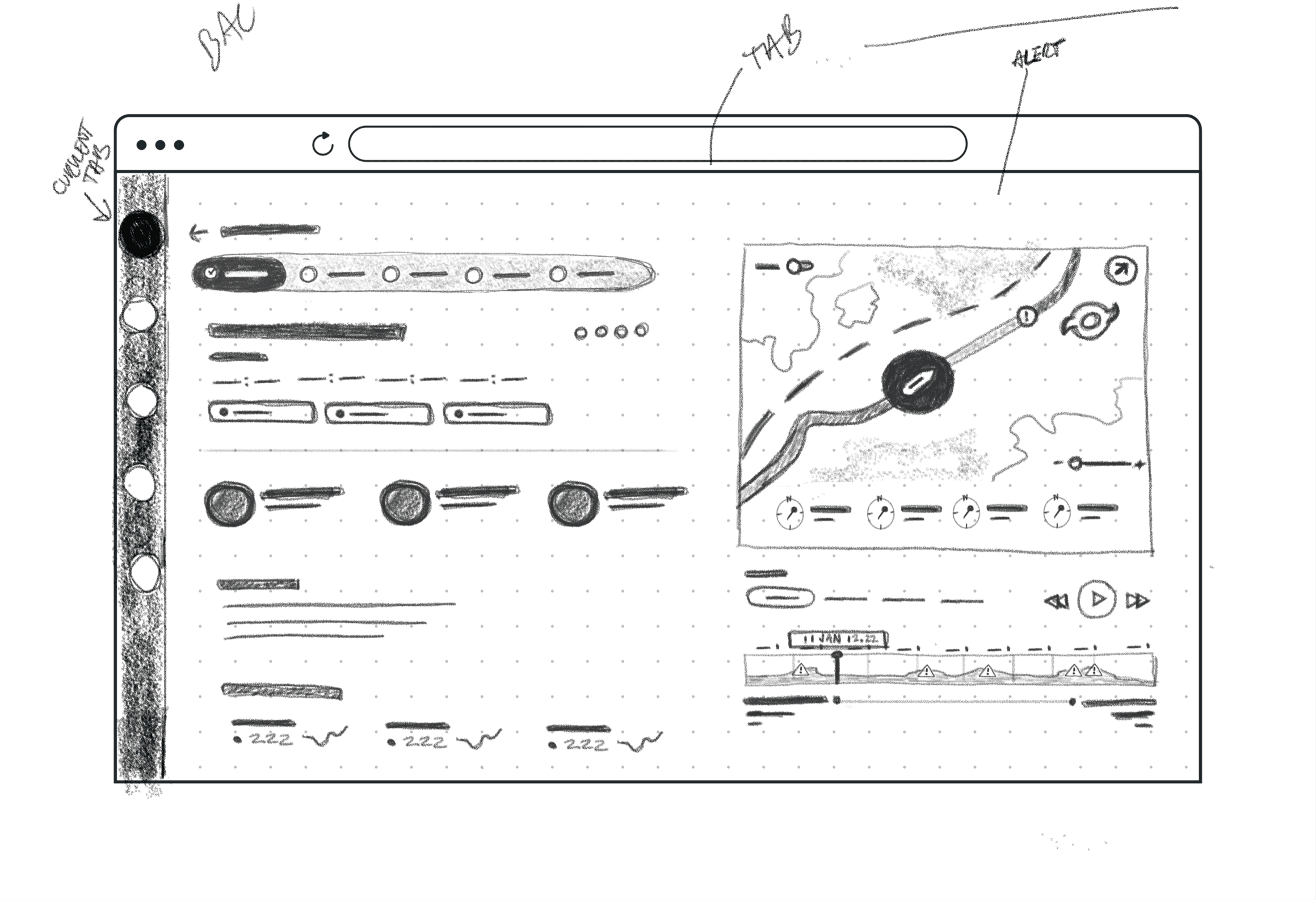
Clicking into a port presents a focused detail view combining capacity, weather, arriving vessel schedules, and port trends: drill into terminals, manage alerts, and identify operational bottlenecks.
Sketching: Routes
Sketching: Routes
The routes view maps shipping corridors and port clusters, showing scheduled arrivals, vessel traffic density, and port congestion to help operators anticipate bottlenecks and optimize routing.

findings

The real problem wasn't just fragmentation, it was hierarchy. Operators don't need all their data at once. They need different information at different moments of their workflow.

At a glance
Which vessels need attention?

Geospatial Context
Where are we in the world? What's the shipping infrastructure?

Monitoring
What's the current state and what's breaking?

Deep Investigation:
Why is this vessel off course? What data supports this decision?

key idea

The ideal experience surfaces exactly the right information at each layer, giving operators instant answers while keeping deeper context one click away.

red and blue cargo ship on body of water during daytime

design approach

We built four interconnected layers, each designed for a specific moment.

Layer 1: Hub Overview

We created an overview that groups vessels by operational status. Instead of forcing operators to scan a list of 1,000+ assets, we organized them into actionable categories. What it does: Operators see which ships are moored, speeding faster than they should, over-consuming fuel, or running late. By grouping vessels into these categories, they can hone in on problem areas immediately and drill into any category to investigate further. Why it matters: Reduces cognitive overload by pre-filtering data into meaningful, actionable groups. Operators get the signal without the noise.

Layer 2: Multi-View System

We realized operators work differently depending on their immediate goal, so rather than forcing a single view, we built three parallel lenses on the same data. What it does: The Vessels tab shows real-time alerts on each vessel card (mirroring a Zillow-style experience). The Ports tab shifts focus to capacity, arrivals, and terminal details. The Table view provides granular scheduling data for finding ETAs and port status. Each view lets operators sort, filter, and drill deeper. Why it matters: Operators navigate their operations through different lenses depending on the moment. Sometimes they're optimizing by vessel, sometimes by port, sometimes by schedule. Forcing them into one view creates friction.

Layer 3: Deep Detail Screens

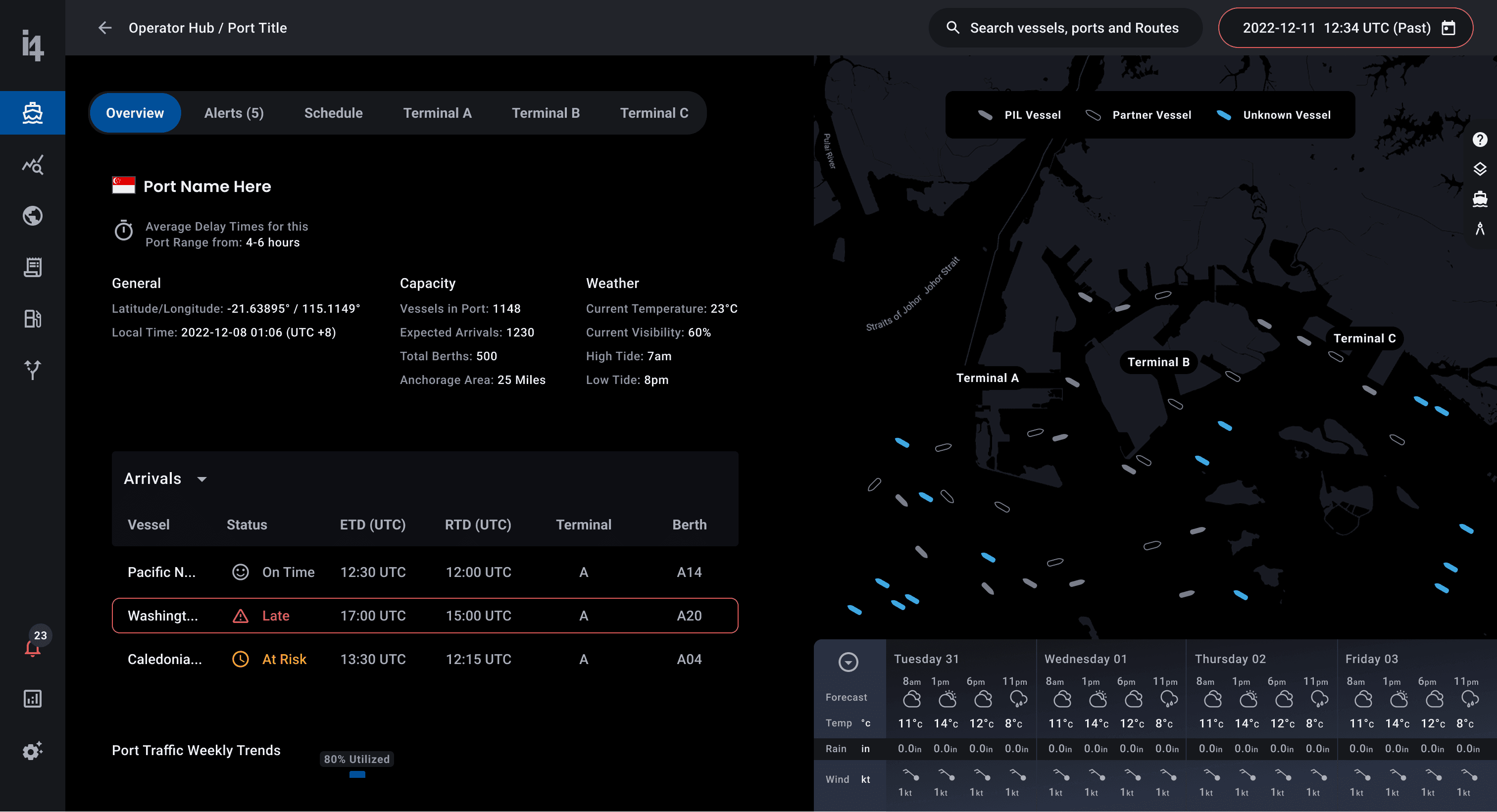
When operators need to investigate, they need full context. What it does: The Vessel Detail view shows tracking, performance data, weather, and alerts—with tools to snooze notifications, add notes, and email the vessel directly. The Port Detail view combines capacity, weather, arriving vessels, and port trends with the ability to drill into terminals and identify bottlenecks. Why it matters: When something goes wrong, operators need to understand the why, not just see a red flag. These detail views provide the investigation tools and full data context they need to make confident decisions.

Layer 4: Map Intelligence

The maritime map isn't a separate tool—it's the foundation connecting every other view. What it does: The map surfaces geospatial context through overlays (wind, pressure, vessel density), filtering by fleet, search across vessels and ports, and timeframe scrubbing to diagnose historical delays. It also visualizes shipping corridors and operational zones to show where vessel traffic concentrates and where vessels should and shouldn't operate. Why it matters: Geospatial data transforms isolated data points into strategic decisions. A weather alert is just noise until you see it on a map. A delayed vessel makes sense when you see what weather it encountered.

We built four interconnected layers, each designed for a specific moment.

Layer 1: Hub Overview

We created an overview that groups vessels by operational status. Instead of forcing operators to scan a list of 1,000+ assets, we organized them into actionable categories. What it does: Operators see which ships are moored, speeding faster than they should, over-consuming fuel, or running late. By grouping vessels into these categories, they can hone in on problem areas immediately and drill into any category to investigate further. Why it matters: Reduces cognitive overload by pre-filtering data into meaningful, actionable groups. Operators get the signal without the noise.

Layer 2: Multi-View System

We realized operators work differently depending on their immediate goal, so rather than forcing a single view, we built three parallel lenses on the same data. What it does: The Vessels tab shows real-time alerts on each vessel card (mirroring a Zillow-style experience). The Ports tab shifts focus to capacity, arrivals, and terminal details. The Table view provides granular scheduling data for finding ETAs and port status. Each view lets operators sort, filter, and drill deeper. Why it matters: Operators navigate their operations through different lenses depending on the moment. Sometimes they're optimizing by vessel, sometimes by port, sometimes by schedule. Forcing them into one view creates friction.

Layer 3: Deep Detail Screens

When operators need to investigate, they need full context. What it does: The Vessel Detail view shows tracking, performance data, weather, and alerts—with tools to snooze notifications, add notes, and email the vessel directly. The Port Detail view combines capacity, weather, arriving vessels, and port trends with the ability to drill into terminals and identify bottlenecks. Why it matters: When something goes wrong, operators need to understand the why, not just see a red flag. These detail views provide the investigation tools and full data context they need to make confident decisions.

Layer 4: Map Intelligence

The maritime map isn't a separate tool—it's the foundation connecting every other view. What it does: The map surfaces geospatial context through overlays (wind, pressure, vessel density), filtering by fleet, search across vessels and ports, and timeframe scrubbing to diagnose historical delays. It also visualizes shipping corridors and operational zones to show where vessel traffic concentrates and where vessels should and shouldn't operate. Why it matters: Geospatial data transforms isolated data points into strategic decisions. A weather alert is just noise until you see it on a map. A delayed vessel makes sense when you see what weather it encountered.

design system and component library

We created a Material UI-based design system with a material token naming architecture that served as the connective tissue across all four layers. Consistent patterns for cards, alerts, and interactions meant the platform felt unified.

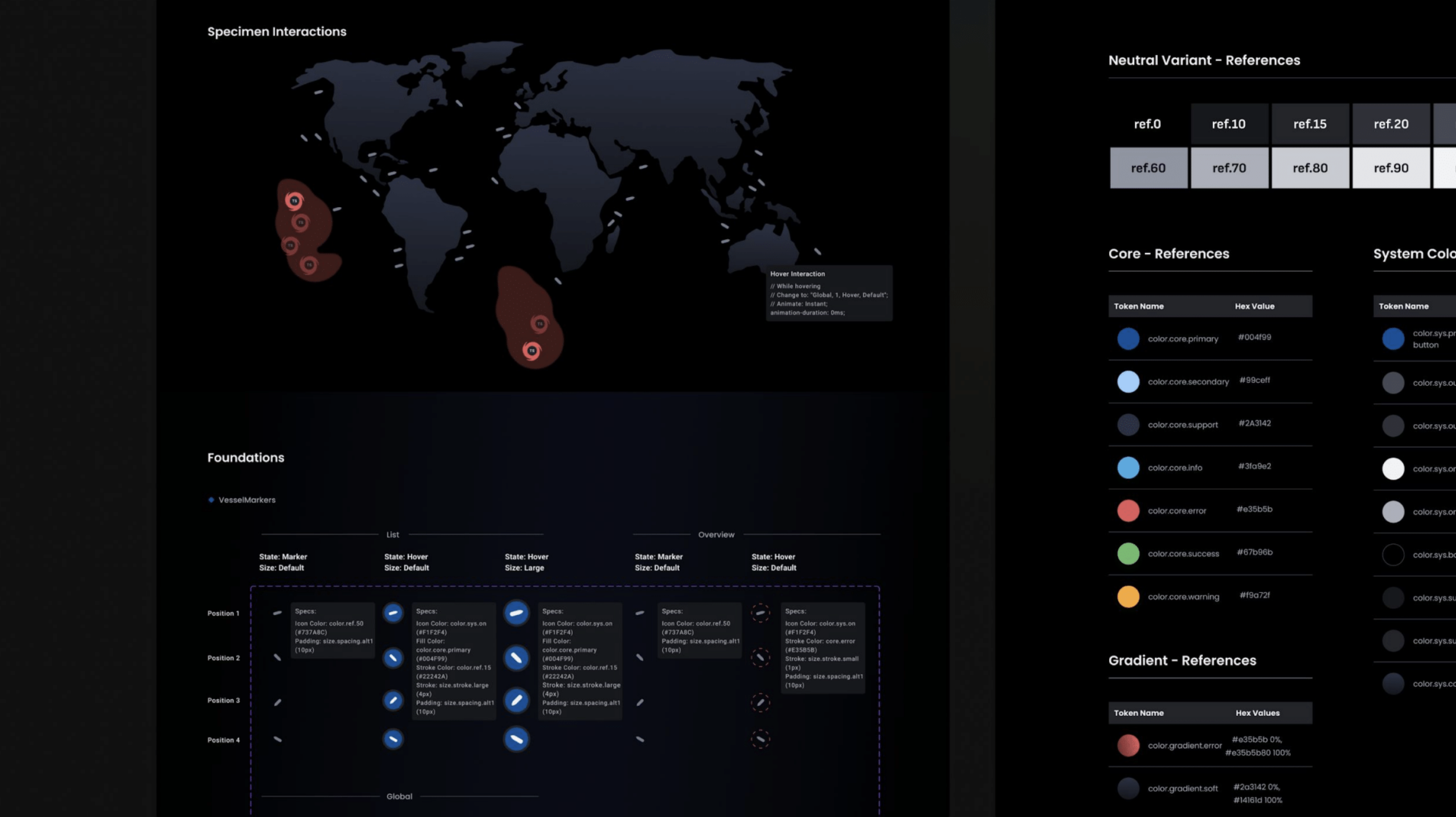
Component sheets were built out to preview interactivity and include motion specs

This dual purpose style of organization created on source of truth for the main component at the module level down to the atomic level with built-in interactivity and annotation.

Atomic components were built with nested components from the material system

This approach helped ensure that all design decisions were rooted in a base element pulled directly from the material design system. Engineers could easily leverage the material icon library to find the a 1:1 UI equivalent pre-built for them.

Story 1

We created a Material UI-based design system with a material token naming architecture that served as the connective tissue across all four layers. Consistent patterns for cards, alerts, and interactions meant the platform felt unified.

Component sheets were built out to preview interactivity and include motion specs

This dual purpose style of organization created on source of truth for the main component at the module level down to the atomic level with built-in interactivity and annotation.

Atomic components were built with nested components from the material system

This approach helped ensure that all design decisions were rooted in a base element pulled directly from the material design system. Engineers could easily leverage the material icon library to find the a 1:1 UI equivalent pre-built for them.

Story 1

quick recap

Operators needed anticipation, not just reporting. We designed for scenario planning and what-ifs rather than passive data display.

  • Ruthless prioritization shaped every layer. The hub surfaced categories, cards showed alerts, details showed everything. Nothing cluttered the view unless it earned its place.

  • Consistency across scales was non-negotiable. The same card patterns, alert language, and interactions meant operators could shift between overview and detail without relearning the interface.

  • The map was the foundation, not a feature. It grounded every other layer in geographic reality and connected everything together.


This project tought me an essential lesson…

We pushed the visual experience hard per the team's request, but I learned something important. When a client wants to shoot for the moon, you need to ensure the rocket is built properly first. Showing an end state vision without an iterative path means you might never actually ship.
Part of that is understanding the developer side. I was focused on design vision without fully grasping their tech constraints. There could have been a working product using their existing stack that wasn't as slick but actually existed. Since then, I've prioritized understanding their databases, frameworks, and organizational maturity before designing. It keeps my work ambitious but buildable, not a pipe dream.

stills gallery

Clickable Protoype (Expand for Best Experience)